

よみはテキストを入力して、Yomitanでスキャンできるシンプルなサイトです。
あうどるがデベロッパーです。
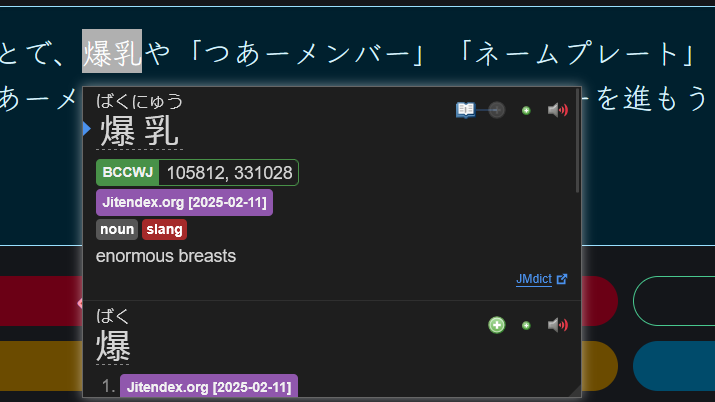
テキストをマウスオーバーして、Shiftキーを押したら、辞書がポップアップというブラウザ拡張機能です。(スマホもタップでできます)
公式サイトで詳細です 👉 https://yomitan.wiki/(英語のみですが)
下記はよみで機能を実行できるショートカットと、一般的なショートカットです。
| キー | 機能 |
|---|---|
| Enter | テキスト入力にフォーカスを当てる |
| Escape | テキスト入力のフォーカスを外す |
| F1 | リセット |
| F2 | Google Imagesを新しいタブで開く |
| F3 | 画像/テキスト入力を切り替える(古い機能) |
| F4 | Jishoで調べる |
| | |
| 一般的なショートカット | |
| Ctrl + A | すべて選択 |
| Ctrl + C | コピー |
| Ctrl + V | 貼り付け |
| Ctrl + Backspace | 単語削除(左) |
| Ctrl + Delete | 単語削除(右) |
| Home | TOPへ移動 |
| Ctrl + マウスの左クリック | リンクを新しいタブで開く |
| Escape | (Yomitan表示時)Yomitanを閉じる |
Yomi is a simple website to input text and scan with Yomitan.
Developed by Audr.
It is a browser extension that lets you hover your cursor over a piece of text, press Shift and a dictionary pops up. In mobile, you can just simply tap.
Get it here 👉 https://yomitan.wiki/
Below is a list of keyboard shortcuts that activate specific actions in this website, along with other normal keyboard shortcuts for reference.
| Keys | Action |
|---|---|
| Enter | Select Text Input |
| Escape | Deselect Text Input |
| F1 | Reset |
| F2 | Open Google Images in New Tab |
| F3 | Toggle Image / Text Input (Obsolete Feature) |
| F4 | Search on Jisho |
| | |
| General Useful Shortcuts | |
| Ctrl + A | Select All |
| Ctrl + C | Copy |
| Ctrl + V | Paste |
| Ctrl + Backspace | Delete Entire Word (to the Left) |
| Ctrl + Delete | Delete Entire Word (to the Right) |
| Home | Go to Top (of the page) |
| Ctrl + Mouse Left Click | Open Link in New Tab |
| Escape | (If Yomitan Popup is Open) Close Yomitan Popup |